
Proposal
Research
Practical
Evaluation
The rational for my project is based around a spring fashion show which is part of the SEC 2024 festival period. I will have my main focus on AV for this as I have a joint PM and AV roll at college which I successfully secured in my interviews at the beginning of the year. As I have an excellent track record for Production management and AV, I am confident in taking on both roles for my project. During year one on my course, I was solely AV however now I can confidently manage different productions such as bands, gigs, dance shows, musicals and plays.
The concept for my project is to manage and film a spring collection fashion show. I will manage all aspects of the setup and design aspects alongside the AV requirements. I will research elements of fashion show setups even though I have some experience in these already from my college work last year. The skills I will need to complete my project are technical skills using cameras, Audio visual hardware and software as well as staging and a god understanding of heath and safety. I will produce a final live mix of the production along with relevant documentation.
The way I will evaluate myself is that I will gather feedback from peers and staff and maintain a schedule making sure that I keep on track.
Timeline
| Week 1 | Research, Planning And Meetings |
| Week 2 | Research, Planning And Meetings |
| Week 3 | Setup And Testing |
| Week 4 | Tech Week |
| Week 5 | Show Week |
| Week 6 | Evaluation |
Resources
The resources I will need are pen and paper for note taking, computer for emailing, designing the set and AV setup/media, technical hardware and software to complete the show.
PM
- What does a production manager do? (2023) Get into Theatre. Available at: https://getintotheatre.org/blog/what-does-a-theatre-production-manager-do/
This link is useful as it goes into vast detail on what production management is, what it means, and general requirements for it. It also develops what personal and professional skills are associated for the role.
- What is an apprentice production manager? (no date) Chichester Festival Theatre. Available at: https://www.cft.org.uk/news/apprentice-production-manager
This is also quite a nice link as it is more of a blog post outlining someone’s personal experiences of the job role and what they did to get the job and then what they did in the job also what the job role means to them.
AV
The term “audio visual,” or “AV,” refers to the merging of sound and vision. The term “audio-visual” describes a broad spectrum of digital audio and video equipment used in private homes, businesses, educational institutions and live events.
The usage of audio-visual technology is widespread since it has so many benefits. For instance, AV is utilised for meetings, video conferencing, presentations, and many other things in the business world. AV is utilised as a teaching technique in education. AV may be employed in your home for your TV and sound system. Finally AV can be used in theatres and live events as a way of creating the backdrop for a scene or adding animations for atmosphere
Examples of AV equipment are; Webcams, Screens and projectors, Whiteboards and interactive projectors, Home Cinemas and Video Conferences.

Image 2 (Right) is our typical AV setup consisting of a Roland V-1600HD vision mixer, Atem mini pro, AV laptop running different software’s and a Wi-Fi hub to allow remote access to cameras and mixing hardware.
Production Design
- Designing a production – theatre design – GCSE drama revision – WJEC – BBC bitesize (2023) BBC News. Available at: https://www.bbc.co.uk/bitesize/guides/z39x34j/revision/1
This article is good as it gets straight to the point giving a brief overview of production design
- What is production design? everything you need to know. Available at: https://www.backstage.com/magazine/article/what-is-production-design-75402/
This is useful as it not only talks about what it is but also why it is useful and how it differs for different environments.
Working with models
- Build A Relationship With Your Models
- Learn To Work Quickly
- Openly Communicate With Your Subject
- Always Pay Attention To Everything, Know Your Plan And Be Confident
- Make It Fun
- Make Sure Your Models Are Comfortable (But Get The Shot)
- Know Your Plan And Be Confident
- Have Your Own Identity
- Know When Something Is Overdone And Don’t Be Afraid To Be The Bad Guy
- Show Your Talent The Results
Berlin, J. (2019) 15 pro tips for working with models when you’re on set, Sony | Alpha Universe. Available at: https://alphauniverse.com/stories/15-pro-tips-for-working-with-models-when-you-re-on-set/

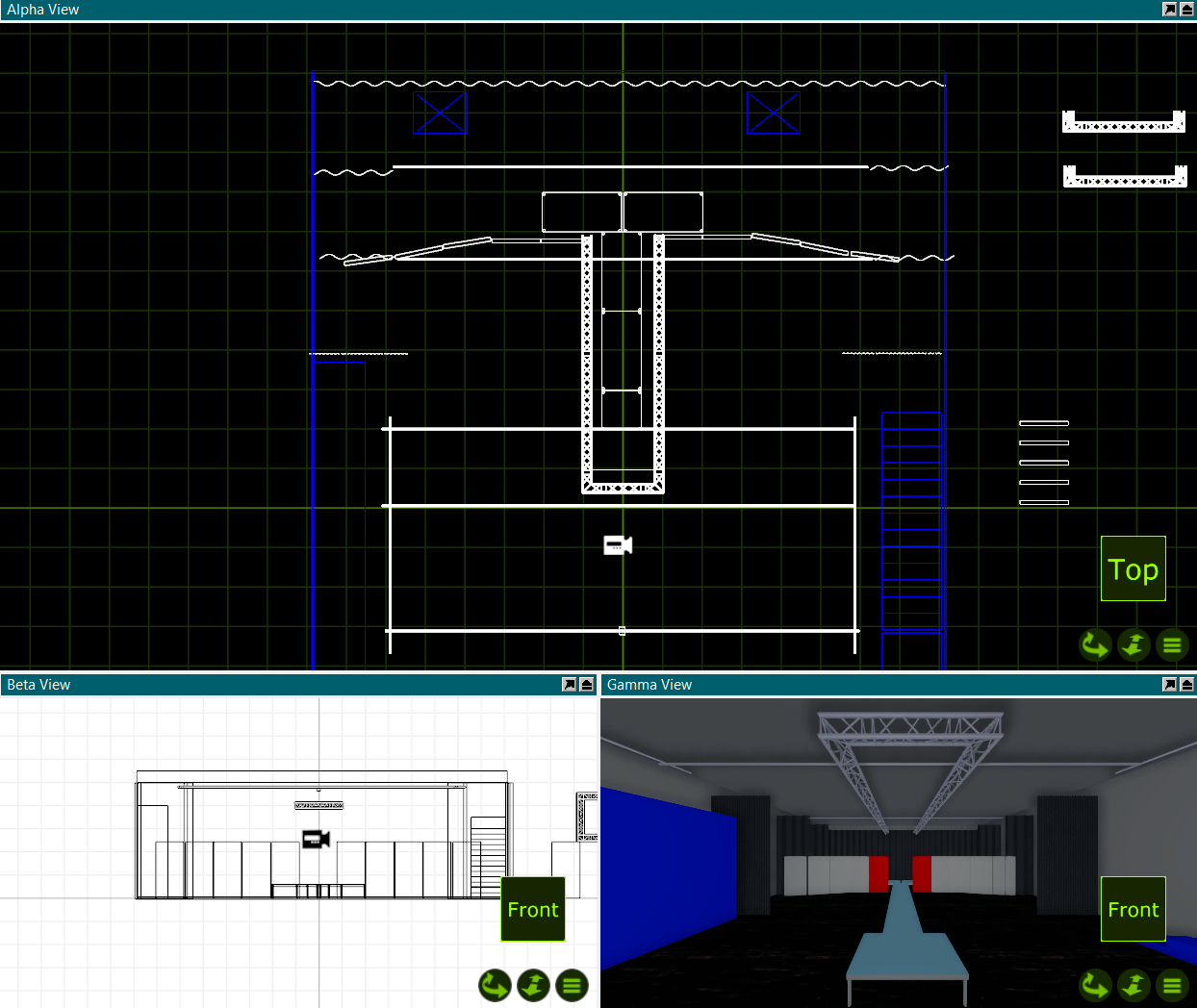
Image 4 (Right) is a screenshot from a set design we have created using Capture Student Edition. these are helpful to work out scale, sizing, positioning and a rough idea of the final look of the production.
The History, Types, and Processing of LED Video Walls
Accompanying AV (Audio Visual) Lighting, projection, and sound design. One of the newest elements to come into the world of theatre, corporate events, and music performance is LED video walls. These have played a vital role in creating exciting and innovative ways of presenting to an audience. LED walls are growing in popularity and are becoming a key aspect within the live event industry; however, they also have uses far beyond this, including advertising and several other things. In this essay, I intend to explore the history and development of LED walls, their growing popularity, and outline the main software used to setup and control them. I will also explore the different manufacturers and types of screens, including transparent screens, and how they have innovated in the development of the technology.
How LEDs came to be
The first light-emitting diode was accidentally made by a British inventor. Henry Joseph Round was employed by the Marconi Company and conducted radio technology experiments in Guglielmo Marconi’s lab to enhance Marconi’s equipment. When he tested the impact of putting a current through a number of substances in 1907, he noticed that when the current was applied to silicon carbide, the crystal emitted a “yellowish light.” He called the end product “a bright glow” in a letter to Electrical World. Round had no idea that he had invented the first LED. Round never pursued the light-emitting diode; his research led him to other areas. In the course of a fifty-year career, Round filed one hundred and seventeen patent applications. He helped the British war efforts in both World Wars I and II, collaborating with the team of researchers who discovered sonar. Subsequently, he would take additional developments from others to match his original discoveries in LED technology.
Light-emitting diodes were originally produced in the 1960s and were exclusively available in red for the following ten years. The substances used in their construction are to blame for this, and due to their $200 manufacturing cost, LEDs were initially limited to usage in specialised laboratory equipment. In 1971, a $400 pocket calculator was among the first consumer electronics to use LED technology. Considering that it didn’t even do algebra, it is a bit pricey! And if you’re a watch collector, you may have seen the well-known Pulsar LED watch, which debuted in 1972 and was the first timepiece to use LEDs to tell the time. Additionally, it was somewhat pricey, costing $2,100.
White light was eventually produced in 1993 by covering blue LEDs with yellow phosphor. This was a breakthrough. LEDs can now be used as light sources instead of just being used as traffic and vehicle light indicators, with flashlights being one of the first consumer goods to adopt LED lighting since they consume less energy and last longer than incandescent lights.
- Led history lesson, part 1: The led origin story—Lime Energy (2019) lime.
- The history of LED video walls (2021) Viewpointec
History of LED Walls
The first outdoor advertising displays using LED technology appeared in the 1980s. LED strips attached to printed circuit boards look great for displaying text and basic images. Although not as advanced as later commercial displays, their limited resolution and lack of colour reproduction did not diminish their usefulness.
By the end of the 1990s, surface mount technology (SMT) was developed for mounting LEDs on printed circuits. , paving the way for full-colour LED displays. This made it possible to create much higher-density LED arrays, resulting in screens with higher pixel counts. Already in the early 1990s, full-colour LED screens were used for indoor advertising and stadium scoreboards.
The use of surface-mount devices (SMDs) is a common practice in the electronics industry today and can be found in almost all the latest consumer technology. From smartphones and tablets to automotive electronics and home appliances, SMD technology allows manufacturers to pack more functionality into smaller, lighter, more powerful, and cheaper devices.
Types of LED Walls
There are several types of LED screens, varying in their capabilities and innovations, such as LED touch walls. (Adding touch technology to any large format screens and LED walls means you can create a custom-size touch screen for your event, activation, or exhibition stand.) Touchless Control (custom-built technology for a socially distant world) Using touchless screen tools such as SmartConnect (a web-based app enabling visitors and customers to take complete control of an LED wall or large screen using their mobile device.), Gesture Touch Screens: Operate a touchscreen without touching it with gesture touch technology. Installing simple yet effective gesture touch tools that enable movement to trigger content on a screen. (Ideal for use in shop window displays, outdoor screens, and informational digital signage.) In addition to these, there are also more basic and more common LED walls.
Every LED wall has its own pixel pitch. Pixel pitch is the term used to describe the density of the pixels (LED clusters) on an LED display and correlates with resolution. Sometimes referred to as pitch or dot pitch, the pixel pitch is the distance in millimetres from the centre of a pixel to the centre of the adjacent pixel. Since pixel pitch indicates the amount of space between two pixels, a smaller pixel pitch means there is less empty space between pixels. This equates to higher pixel density and improved screen resolution.
Pixel pitch plays a crucial role in setting the screen’s optimal viewing distance. Smoother edges and finer details are obtained in the image with smaller pixel pitch values. In this way, the viewer can stand closer to the screen and enjoy a clear image without being disturbed by the separation of individual pixels. When determining viewing distance and pixel spacing, the rule of thumb is that smaller pixel spacing allows for closer viewing. Conversely, higher pixel density increases the minimum viewing distance. So, the resolution and optimal viewing distance of a 1.2-mm screen are significantly greater than those of a 16-mm screen. While higher pixel density improves visual quality, it is not the ideal choice for every situation. The extra pixel density is for a closer viewing distance. At longer viewing distances, higher pixel density loses its visual benefits and only increases the cost of the display.
In conclusion, LED walls have developed since the initial invention of low-resolution screens to individual tiles with up to 9000 LED’s.
LED wall processors and controllers
An LED wall processor or controller is a special computer system used to control and manage the display of content on an LED video wall. The processor takes signals from various input sources, such as computers and media players that are running the content, with Resolume being the most common and popular software for running visuals. then converts it into data that the LED display can read. This includes adding data, setting the correct resolution, and adjusting the brightness to different levels to optimise the best display quality. The formatted data is sent to the LED wall via a network connection or directly to the LED wall controller board. LED processors are available in different sizes and capacities, allowing users to choose the right one for their needs. Usually, the larger the processor, the more powerful it will be. For example, higher-end processors may support more inputs and outputs while also providing better image quality.
There are primarily two types of controllers: hardware-based controllers and software-based PC and video-card controllers.
Hardware-based controllers: These are made for a specific model or series of LED video walls and contain all the necessary electronics to drive these panels. If a user has a single model of LED video wall, they might find this type of controller preferable because it won’t require any additional processing power from their computer.
Software-based controllers: A software-based controller typically plugs into a desktop or laptop’s USB port and receives instructions from this device. As long as the PC is running the necessary applications for displaying video on the LED panels, this type of controller will work with any LED video wall model with drivers compatible with Windows operating systems (XP onward).
Overall, an LED wall processor or controller is an essential component for anyone who wants to create stunning visual displays on an LED video wall.
In order for the processor to correctly communicate with the screen it needs to be connected to a windows computer to be setup using a software called NovaLCT. NovaLCT is the LED display configuration tool for computers provided by Novastar. It can work with receiving cards, monitoring cards, and multi-function cards, and can achieve brightness adjustment, power supply control, error detection, and smart settings.
In conclusion LED walls and associated software have revolutionised the live events industry creating new and exciting worlds.
Week 1 – Research and Planning
In this week I did my initial research (see research section above) and had my first Production meeting with the Hair and Beauty teacher Jo. In this meeting we discussed out initial thoughts on set, lighting, running of the day, themes, and objectives for the project. This was helpful as it gave me an idea of her thoughts and expectations yet also gave me the opportunity to discuss health and safety and what is and isn’t possible. Following this meeting I scheduled a follow up meeting for the following week and then me and my stage crew designed our first two drafts of the set.

Week 3 – Setup and Testing
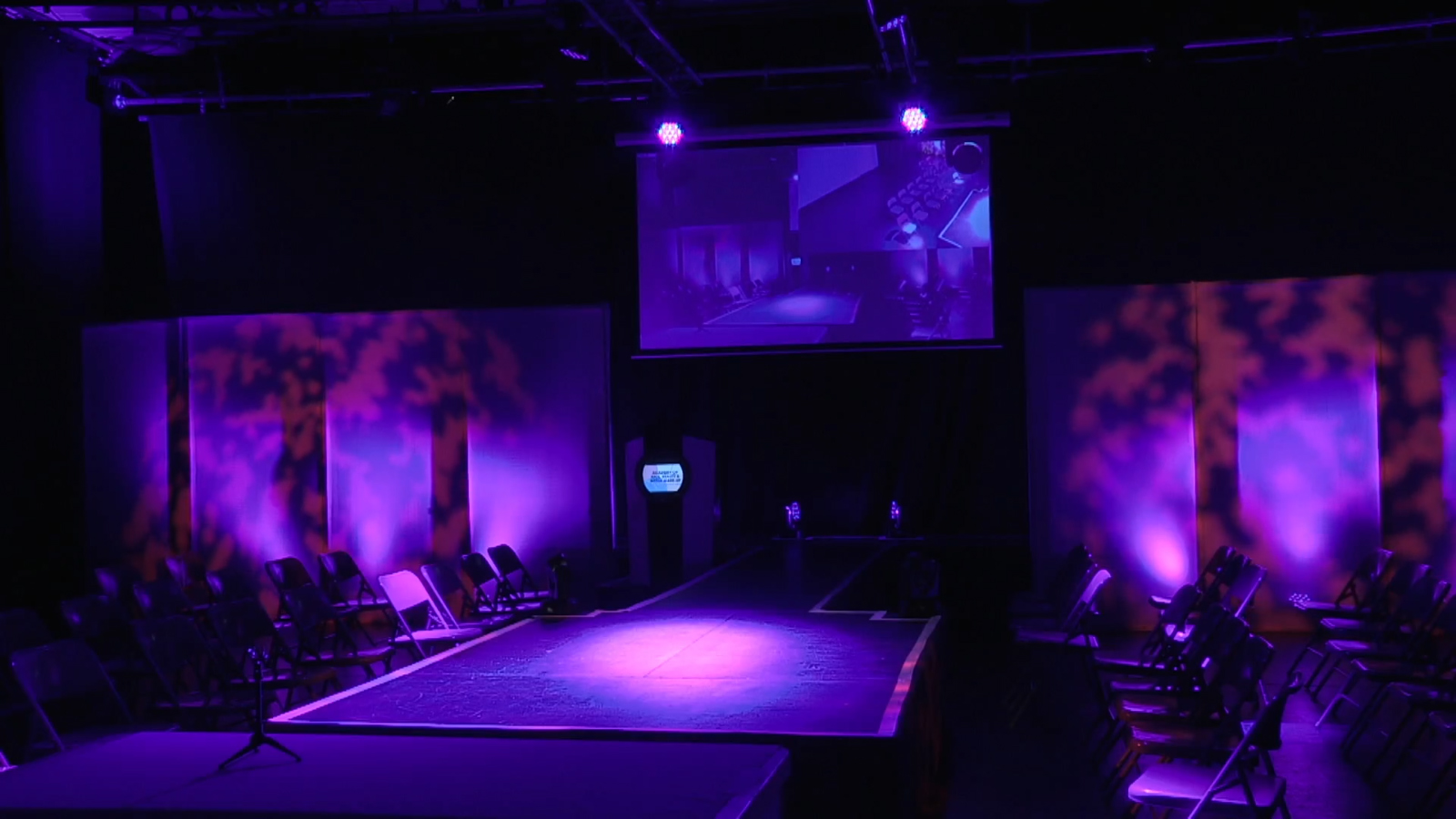
This was our tech week. This meant we were clearing the auditorium from our previous show and starting to setup our final Stage plan for the 2024 Hair and Beauty collection. As I was also doing AV for this production I delegated the setup to each teams heads of departments to setup so I could focus on my AV setup. The AV for this production was quite simple as it was a central projector with a chromakey effect on so that we could display both cameras and mood boards at the same time.

Week 5 – Show Week
SHOW WEEK! The moment we’ve all been working towards. All out hard work and effort finally on display! On the day of the show, we did a very quick and rushed walk through of what’s happening for the models, made and final adjustments and then it was time let the audience in.as the audience trickled in the house music was playing, the house lighting was on and the AV holding slide was being projected onto the screen. When everyone was in and seated, we started with the first model and once the event had finessed and the audience had left we had a quick tidy up and then de rigged the event the next day.
Week 2 – Research and Planning
During this week we finalised our first drafts and worked out a couple logistics on timings, locations, and end results. We then shared all this information with Jo in our production meeting we organised last week. This was quite a quick meeting as it was mainly just sharing our drafts where she decided on draft 2 with an ‘I’ shaped catwalk. In this meeting we also finalised the rest of the production timings, colour pallets and AV choices. After the meeting me and my Stage teem again developed our draft stage plan that had just been confirmed into our final Stage plan for everyone to follow next week.

Week 4 – Tech week
Continuing from last week, we finished our setup. However, the AV setup wasn’t as easy as expected due to the projector and lights casting shadows onto the screen. This was resolved by lowering the projector and raising the lights slightly so that the lights were not in the way and the projection was unobstructed. I also spent this week designing and putting together the poster for the production and also the Mood Boards that are to be projected with the PTZ on picture in picture mode onto the screen too. We made some final last-minute adjustments to the set including adding a black tab to the back winch bar to create a larger backstage area.
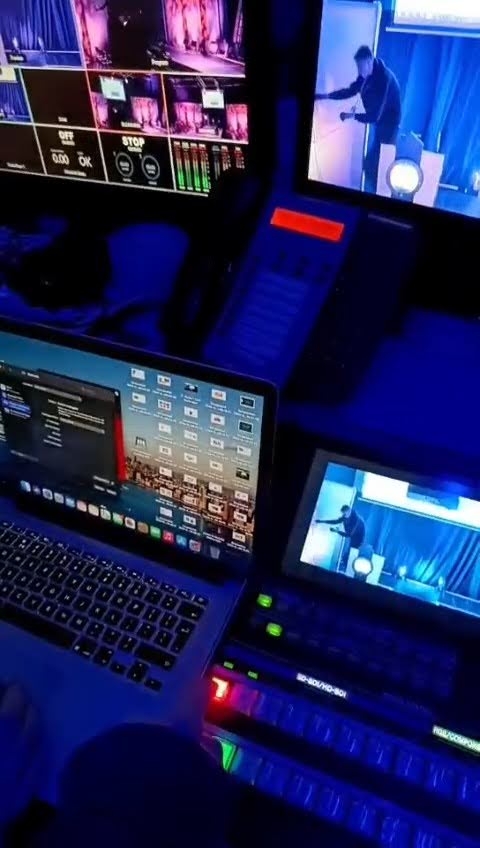

Here Is A Short Clip From The Show!
Overall, the show was a complete success the audience gave their feedback stating it was verry enjoyable and well put together. Jo the hair and beauty teacher said it was fantastic working with the production arts students and she would happily do it again next year. As I have worked on fashion shows before this production although was a demand to organise was simplistic from a technical point of view as I have done more complex designs before.
- The main strengths were that the fashion show was visually interesting, had an audience and that the fashion exhibits were interesting to see.
- I feel I organised it verry well and kept to my schedule and my crew worked well in getting everything setup in time along with the Front of House staff serving refreshments and making then audience feel comfortable
- The time for this project allowed us to experiment with AV and push the hardware and software to its full potential such as using wireless controls over the new technical network and NDI streaming.
There are some areas of development for example.
- There wasn’t enough time to organise the models and do a proper dress run meaning some of them rushed their runway.
- There were some cold spots on the stage and would have hoped that my lighting designer would have fixed this issue. As I was overseeing the entire project and the AV department it was difficult for me to focus on these minor details too.
- Next time I would insist on a proper run though as at times the stylists name did not match the names on screen. This was also caused by a breakdown in communication backstage. One way of fixing that would be to give an earpiece to the presenter so that we can try and control the pace a bit better.
Other than these small issues the show was to near professional standards, with all departments working well. I feel this was a good final project as it showed what I could do in the world of AV and Production management.